

An OBD2 code reader tells you which fault the vehicle's diagnostic system detected; it does not automatically identify the part that must be replaced. Read every stored, pending, and permanent code, save freeze-frame and readiness information before clearing anything, then test the circuit or system named by the code.
What Does an OBD2 Code Reader Do?
A basic OBD2 code reader connects to the standardized diagnostic connector and communicates with the vehicle's emissions-related onboard diagnostic system. Its core jobs are reading diagnostic trouble codes, showing the check-engine-light status, erasing eligible emissions data, and reporting readiness-monitor status. Many readers also show freeze-frame data and live data.
That standard access should not be confused with full-vehicle coverage. Reading engine and emissions codes does not guarantee access to ABS, airbag, transmission, body, TPMS, parking-brake, or other manufacturer-specific modules. Those functions depend on the scanner, software, vehicle, and module.
Code reader vs scan tool: Sellers often use the names interchangeably. Instead of buying by the label, verify the exact modules and functions you need. A simple reader may handle a check-engine light; deeper faults can require full-system access, live data, active tests, or service functions.
How to Read an OBD2 Trouble Code
A diagnostic trouble code has five characters. Use the characters to identify the general system and code family, then use reliable service information for the full definition and test procedure.
| Position | What it tells you | Example using P0300 |
|---|---|---|
| First letter | System family: P powertrain, B body, C chassis, or U network communication. | P means powertrain. |
| Second character | Often distinguishes a standardized generic code from a manufacturer-defined code. Values beyond 0 and 1 require system-specific interpretation. | 0 identifies a standardized generic code. |
| Third character | Narrows the subsystem or fault group. Its meaning depends on the first character and code standard. | 3 belongs to the ignition or misfire group. |
| Last two characters | Identify the specific monitored fault within that group. | 00 identifies random or multiple-cylinder misfire detected. |
Examples make the pattern easier to see: P0128 concerns coolant temperature below the thermostat regulating temperature; P0171 concerns a system-too-lean condition on Bank 1; and P0455 concerns a large evaporative-emissions leak. None of those descriptions proves that a thermostat, oxygen sensor, or gas cap is automatically the failed part. The code describes what the control system detected.
Pending, Stored, and Permanent Codes
| Status | What it usually means | What to do |
|---|---|---|
| Pending | The monitor detected a condition, but it may not yet have met the criteria to command the malfunction indicator light. | Record it and look for supporting symptoms or data. Do not dismiss a recurring pending code. |
| Stored / confirmed | The system has confirmed the fault according to its monitoring logic. It may be associated with the check-engine light. | Save the code and freeze frame, then follow the proper diagnostic path. |
| Permanent | A confirmed emissions-related code kept in nonvolatile memory so it cannot be hidden by simply clearing codes or disconnecting the battery. | Repair the cause. The vehicle's OBD system removes it only after the required monitor runs and verifies the repair. |
| History | Some enhanced systems retain a record of a fault that is no longer current. | Use timing, mileage, service history, and current data to decide whether it is relevant. |
Clearing is not repairing. Erasing eligible codes also removes useful freeze-frame information and resets readiness monitors to not ready. A permanent DTC is not manually erasable. Save the evidence before changing vehicle memory.
How to Use Code Reader Results Correctly
A flashing check-engine light can indicate a severe misfire that may damage the catalytic converter. Reduce load and seek service promptly. Also note overheating, low oil pressure, stalling, smoke, or unusual noise.
Read all available modules if the tool supports them. Record every code exactly, including its status and module.
Freeze frame captures selected operating conditions when a fault was stored. Coolant temperature, engine speed, load, fuel trim, and vehicle speed can reveal when the fault appeared.
A communication or voltage problem can create multiple symptoms. Diagnose the code group as a system instead of treating each description as an independent parts order.
Use the model, year, engine, module, full code, technical service information, wiring diagrams, and known test conditions. Manufacturer-specific definitions matter.
Inspect wiring, connectors, hoses, fluid levels, power, ground, reference voltage, sensor signals, and mechanical conditions as the diagnostic procedure requires.
After the cause is corrected, clear eligible codes only when the procedure calls for it. Complete an appropriate drive cycle and rescan to confirm that the code and symptom do not return.
Live data is most useful when it answers a specific question. If you need help choosing and interpreting parameters, use our guide to OBD2 live data, fuel trims, O2, MAF, and coolant temperature.
What a Basic OBD2 Code Reader May Not Do
- Read every non-powertrain module such as ABS, SRS/airbag, body, TPMS, or electronic parking brake.
- Display manufacturer-enhanced data or proprietary code definitions for every vehicle.
- Command components on and off through bidirectional active tests.
- Perform service functions such as electronic parking-brake service, steering-angle calibration, or special resets.
- Program modules, perform online coding, or replace manufacturer software.
- Prove which part has failed without inspection, tests, and vehicle-specific information.
These are not defects in OBD2. They are boundaries between standardized emissions diagnostics and manufacturer-specific vehicle systems. Buy enough access for the work you actually plan to do.
When You Need More Than a Basic Code Reader
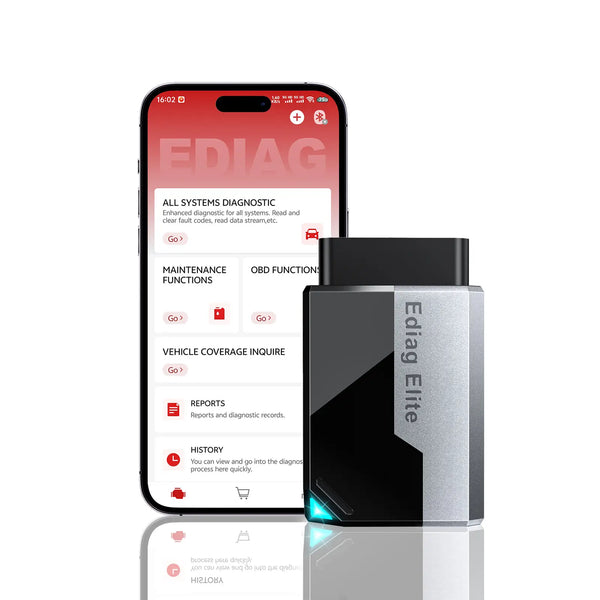
KINGBOLEN EDIAG Elite
Best fit: owners who want phone-based portability plus deeper vehicle access than a basic engine-code reader.
Start with full OBD2 functions, then use supported full-system scanning, live data, freeze frame, active tests, and service functions when the vehicle and job require more context.
See capabilities and limits
- Current listing includes all ten OBD2 test modes, freeze frame, I/M readiness, and live data.
- Supports full-system diagnostics, bidirectional tests, and 15+ service functions where available for the vehicle.
- Supports compatible CAN FD applications and uses a paired iOS or Android device.
- Module access, active tests, service functions, and coverage vary by make, model, year, engine, and control module. Verify the VIN and required function before purchase.
If you diagnose vehicles frequently and prefer a dedicated 8-inch tablet with broader professional workflows, compare the KINGBOLEN K8 Pro. Its supported full-system diagnostics, active tests, CAN FD/DoIP access, service functions, and coding capabilities still require vehicle-specific coverage confirmation.
Frequently Asked Questions
What is the difference between an OBD2 reader and scanner?
Does an OBD2 code tell me which part to replace?
Can any OBD2 reader scan ABS and airbag codes?
Why is a permanent code still there after repair?
Can I clear a code to see whether it comes back?
Will an OBD2 reader work on every car?
Bottom line: Treat a trouble code as a starting point, not a parts verdict. Read every status, preserve freeze frame and readiness, diagnose the named system, and verify the repair. When a basic engine-code reader is too limited, the EDIAG Elite adds supported full-system data and tests without giving up phone-based portability.
Product details checked September 4, 2026. Diagnostic coverage and available functions vary by vehicle and module. Confirm the VIN and required function before purchase.

