

Quick answer: You need a CAN FD OBD2 scanner when the vehicle module and diagnostic job you want to access communicate through CAN FD. If you mainly read generic check-engine codes on older vehicles, a conventional OBD2 scanner may be enough. CAN FD becomes more important for technicians and advanced DIY users working on compatible newer platforms, but the words "CAN FD" on a box do not guarantee access to every vehicle, control module, or advanced function.
That distinction matters because OBD2, Classical CAN, CAN FD, and DoIP describe different parts of vehicle diagnostics. A scan tool can support the CAN FD communication format yet still lack the software coverage needed for a particular ABS module, active test, service reset, or coding procedure. The right buying question is therefore not simply, "Does this scanner have CAN FD?" It is, "Does the complete tool support the protocol, vehicle, module, and job I need?"
What is CAN FD, and what does it change?
CAN FD means Controller Area Network with Flexible Data-rate. Bosch introduced it in 2012 as an extension of Classical CAN. According to the Bosch CAN FD protocol overview, Classical CAN carries up to 8 data bytes in one frame, while CAN FD can carry up to 64. CAN FD can also switch to a faster bit rate during the data portion of a frame. It was standardized as ISO 11898-1:2015.
In practical terms, CAN FD gives compatible electronic control units more room to exchange data efficiently. That does not mean every diagnostic screen becomes eight times faster, because scan speed also depends on the vehicle gateway, control modules, diagnostic software, connection, and the procedure being performed. The safe claim is that CAN FD supports a larger payload and an optional faster data phase than Classical CAN.
| What changes | Classical CAN | CAN FD |
|---|---|---|
| Maximum data per frame | Up to 8 bytes | Up to 64 bytes |
| Bit rate behavior | One nominal bit rate | Can switch to a faster rate in the data phase |
| Vehicle use | Common across established vehicle networks | Used on compatible newer vehicle architectures and modules |
| Scanner decision | May be enough for supported older vehicles and basic jobs | Needed when the target diagnostic path specifically requires it |
CAN FD controllers can also communicate using Classical CAN, but that technical compatibility does not replace vehicle-specific diagnostic software.
CAN FD vs OBD2: why they are not the same thing
OBD2 is the standardized diagnostic system and set of services used to report emissions-related faults and data to external test equipment. In the United States, OBD-II became the common requirement for applicable light-duty vehicles beginning with the 1996 model year. It is why a basic reader can retrieve a generic powertrain trouble code, freeze-frame information, and readiness status from many vehicles through the diagnostic connector. The U.S. EPA OBD overview explains this emissions-monitoring role.
CAN is a vehicle communication network. CAN FD is an extended CAN frame format. OBD2 diagnostic services can be carried through supported communication links, including CAN-based links, but OBD2 is not another name for the CAN bus. This is also why an "OBD2 scanner" label alone does not promise manufacturer-level access to the transmission, ABS, SRS, body modules, service resets, active tests, or ECU coding.
When CAN FD support matters
CAN FD should move higher on your buying checklist when you regularly diagnose compatible newer vehicles or need access beyond generic emissions data. It can matter when a vehicle routes manufacturer-level diagnostics to a control module through CAN FD and your work depends on communicating with that module.
Consider a CAN FD-capable scan tool when you expect to:
- Run full-system scans on newer vehicles whose supported modules use CAN FD.
- Read manufacturer-specific faults and live data from those modules.
- Perform supported bidirectional tests, relearns, calibrations, or service functions.
- Carry out supported ECU coding or adaptation procedures where the communication path requires CAN FD.
- Work on several vehicle makes and want the next scanner to cover a broader range of current architectures.
Vehicle age can be a useful clue, but it is not a universal rule. Manufacturers introduced CAN FD on different platforms, modules, and model years. Two vehicles from the same year may have different network requirements, and a vehicle may combine Classical CAN, CAN FD, Ethernet, and other networks. Avoid buying from a generic "2020 and newer" claim unless the seller also confirms your exact vehicle and task.
When a conventional OBD2 scanner may still be enough
You may not need CAN FD if your work is limited to generic engine and emissions diagnostics on supported vehicles. Reading a check-engine code, saving freeze-frame data, checking readiness monitors, and viewing common powertrain parameters do not automatically require a professional CAN FD platform. A reliable conventional scanner can remain the better value when it already supports the vehicles you maintain.
Do not replace a working tool just because a newer protocol exists. Upgrade when there is a defined coverage gap: a vehicle or module you need cannot communicate through your current hardware, or a supported function requires a newer VCI and software package. This job-first approach prevents paying for capability you may never use.
How to check whether your vehicle and job need CAN FD
- Identify the exact vehicle. Record the year, make, model, engine, market, and VIN when available. Do not rely on year alone.
- Name the module. "Read a check-engine code" and "run an active test in the body control module" are different coverage questions.
- Name the exact function. Ask about code reading, live data, an actuator test, a reset, a relearn, coding, or programming separately. Similar labels are not interchangeable.
- Check the complete hardware path. Confirm that the supplied VCI supports CAN FD. Some diagnostic ecosystems require a separate adapter or cable even when the tablet software lists the protocol.
- Verify vehicle-specific software coverage. Protocol support cannot create a function that the diagnostic software does not provide for that module.
- Check gateway requirements. Some newer vehicles restrict write operations behind secure gateways. Confirm whether authorization, an account, or an additional service is required.
When a product page does not provide a vehicle list, contact support with the VIN and the exact job. A useful question is: "Can this tool run the ABS bleed procedure on this VIN?" That is much more reliable than asking whether the scanner "works with" the brand.
CAN FD vs DoIP
CAN FD extends CAN-based communication. DoIP means Diagnostic communication over Internet Protocol. The current ISO 13400-2 standard describes diagnostic communication between test equipment and vehicle systems using IP, TCP, and UDP. The word "Internet" in the name does not mean that the car must connect to the public internet; it describes the networking technology used for the diagnostic connection.
CAN FD and DoIP are not competing versions of the same feature. A vehicle may use DoIP to reach a gateway while modules behind that gateway continue to communicate over CAN-based networks. If you service vehicles or procedures that require both, select a scanner whose supplied communication hardware explicitly supports both. In the product options below, only K8 Pro currently lists both CAN FD and DoIP on its EDIAGTOOL product page.
Choose the CAN FD tool format that fits your work
These three options are not a best-to-worst ranking. They represent different workflows: using a phone, using a compact dedicated tablet, or using a broader workshop platform. Start with confirmed vehicle and function coverage, then choose the form factor that will be comfortable in regular use. You can also review the wider EDIAGTOOL OBD2 scanner collection or compare an app-based scanner with a dedicated tablet.
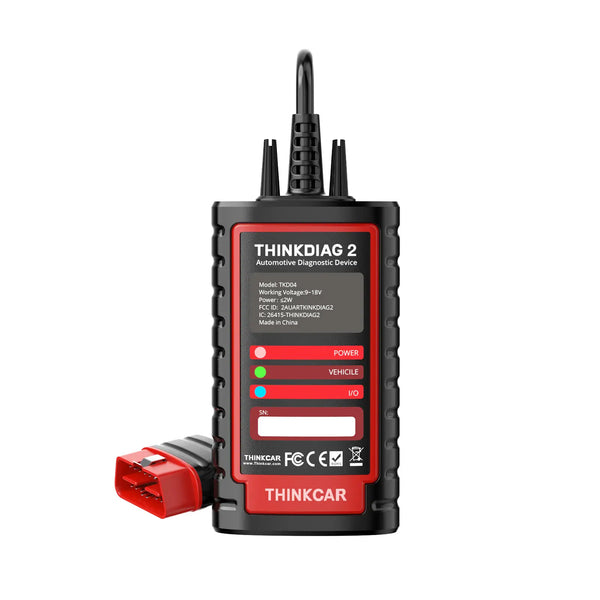
THINKCAR ThinkDiag 2
Phone-based: For advanced DIY users and mobile technicians who want CAN FD diagnostics through a compatible Android or iOS phone.
- Built-in CAN FD and Bluetooth 5.0
- Full-system diagnostics and live data
- Supported active tests and ECU coding
See ThinkDiag 2 details
ThinkDiag 2 works with compatible Android and iOS phones and includes 15+ maintenance functions, AutoVIN, graphical live data, diagnostic reports, and one year of free software updates.
Full-system access, active tests, coding, IMMO functions, and service procedures vary by vehicle make, model, year, control module, and available authorization. If DoIP is also part of your requirement, compare K8 Pro below after checking vehicle compatibility.
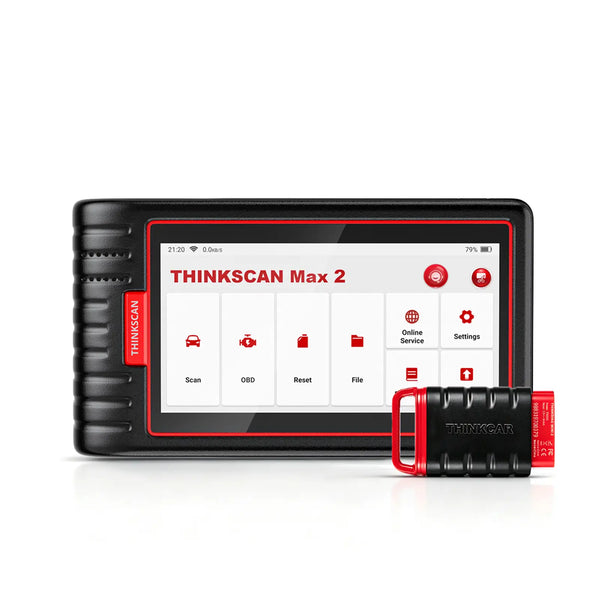
THINKSCAN Max 2
Compact tablet: For users who want a self-contained CAN FD scanner without depending on a personal phone.
- Built-in CAN FD and wireless VCI
- Full-system diagnostics
- 28+ service functions and FCA AutoAuth
See THINKSCAN Max 2 details
THINKSCAN Max 2 currently lists a 5.99-inch Android tablet, AutoVIN and AutoScan, four-in-one graphical live data, diagnostic report sharing, and lifetime free software updates.
Available systems, resets, secured-gateway access, and other advanced functions depend on the vehicle and software. This model is positioned here as the compact CAN FD tablet; choose K8 Pro below when you also need an explicitly supported DoIP workflow.
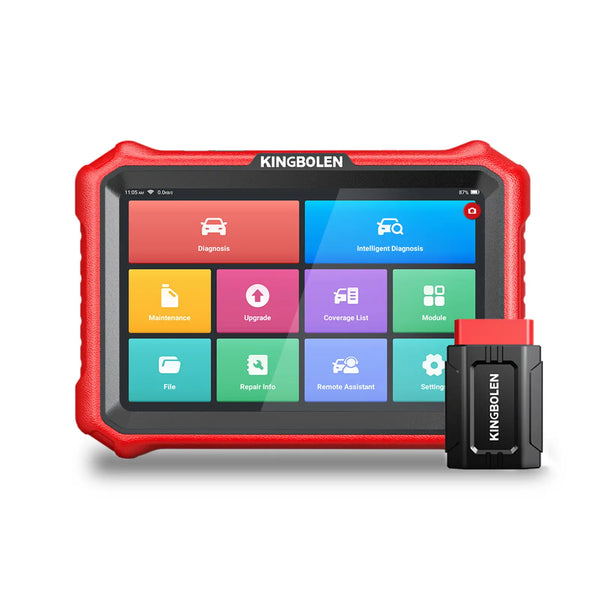
KINGBOLEN K8 Pro
Workshop platform: For workshops and advanced users who need a dedicated platform that supports both CAN FD and DoIP.
- CAN FD and DoIP communication
- Full-system scans and active tests
- Advanced ECU coding and 34+ services
See K8 Pro details
K8 Pro currently lists an 8-inch Android tablet, AutoVIN and AutoScan, FCA AutoAuth, bidirectional control, supported ECU coding, 34+ maintenance functions, and lifetime free updates.
CAN FD and DoIP support does not promise every listed diagnostic or coding function on every vehicle. Confirm the year, make, model, module, required function, and gateway conditions before purchase.
Product pages, canonical links, feature statements, and displayed product images were checked on September 3, 2026. Product software and coverage can change; verify current compatibility before ordering.
Bottom line
Buy CAN FD capability for a confirmed diagnostic need, not because every newer vehicle supposedly requires it. A conventional OBD2 scanner may still be enough for generic emissions work on supported vehicles. CAN FD becomes valuable when the vehicle module and job require that communication path. Check the complete combination of protocol, VCI, software, vehicle, module, function, and gateway access; then choose a phone-based tool, compact tablet, or workshop platform that fits how often and how deeply you diagnose.
Frequently asked questions
Do all new cars use CAN FD?
No. Adoption varies by manufacturer, platform, model year, market, and control module. A vehicle can also use several network types at the same time. Confirm the exact vehicle and diagnostic function instead of relying on a broad year rule.
Will a normal OBD2 scanner work on a CAN FD vehicle?
It may still perform supported generic emissions functions, depending on how the vehicle exposes that data and which communication links the scanner supports. That does not mean it can access every CAN FD module or manufacturer-level function. Check the exact job rather than treating the vehicle as one network.
Does CAN FD support mean full-system diagnostics?
No. CAN FD describes communication capability. Full-system diagnostics also require vehicle-specific software and coverage for each control module. Active tests, service resets, coding, and security access must be confirmed separately.
Is CAN FD backward compatible with Classical CAN?
Bosch states that CAN FD protocol controllers can also perform Classical CAN communication. For a scan tool buyer, however, hardware compatibility still does not guarantee that the tool's diagnostic software supports the vehicle, module, or function you need.
Is CAN FD the same as DoIP?
No. CAN FD is an extended CAN frame format. DoIP carries diagnostic communication using Internet Protocol networking. Some professional tools support both because different vehicles and diagnostic paths require different communication methods.
What should I ask before buying a CAN FD scanner?
Provide the VIN or exact year, make, model, engine, target module, and desired function. Ask whether the supplied VCI supports the required protocol and whether the function needs an adapter, secured-gateway authorization, account, or additional software.
Technical references: Bosch CAN FD Protocol, SAE J1978 OBD-II Scan Tool, ISO 15765-2 DoCAN, and ISO 13400-2 DoIP.

