

The best OBD2 scanner for a Mercedes-Benz is the one that covers your exact model, year and job. A generic code reader is enough for a check-engine light. To diagnose ABS, SRS, transmission, electronic parking brake, battery management or suspension faults, choose a full-system Mercedes-compatible scan tool. For active tests, adaptations or coding, verify the exact function by VIN before buying.
What Scanner Level Does Your Mercedes Need?
“Mercedes code reader” can describe anything from a simple engine-code reader to a professional diagnostic tablet. They may use the same 16-pin port but reach very different control modules. Start with the warning light or service job, then choose the lowest scanner level that actually covers it.
| Need | Scanner level | What it should do |
|---|---|---|
| Check-engine light or emissions readiness | Generic OBD-II reader | Read and clear powertrain codes, show freeze frame, live data and I/M readiness. |
| ABS, airbag, transmission or body warning | Full-system Mercedes-compatible scanner | Communicate with the specific control module, read manufacturer codes and display relevant live data. |
| Maintenance and component replacement | Scanner with confirmed service functions | Perform the exact supported reset, relearn, calibration or battery-related procedure required by the vehicle. |
| Component testing | Bidirectional scan tool | Command supported actuators and observe the vehicle's response during diagnosis. |
| Module setup or vehicle configuration | Advanced coding-capable platform | Carry out the specific supported coding or adaptation workflow; this is not the same as universal ECU programming. |
Generic OBD-II is not full Mercedes diagnosis. A tool may read a P-code from the engine computer yet be unable to access the ABS, SRS, AIRMATIC, transmission or body modules on the same car.
Mercedes-Benz Scanner Features Worth Checking
Long feature lists are less useful than one confirmed function on your vehicle. Write down the system and job before comparing tools.
Look for supported engine, transmission, ABS, SRS, body, climate, parking brake, battery and suspension modules. Actual modules vary by chassis and equipment.
Manufacturer codes and module data provide more context than generic P-codes alone.
Confirm the exact reset or relearn you need, such as oil service, EPB, steering angle, battery matching, ABS bleeding or suspension calibration.
Supported active tests can command items such as fans, pumps, valves, locks or lights to separate an actuator fault from a control or wiring problem.
Check whether the tool supports the required Mercedes chassis, module and operation. “ECU coding” does not mean every module can be programmed.
Compare the included update period, renewal cost and what remains usable when updates end.
Do You Need CAN FD or DoIP?
Only buy around a protocol when the vehicle and function require it. CAN FD and DoIP are communication technologies used on some newer platforms; their presence on a scanner does not guarantee every Mercedes function. The most reliable check remains the exact year, model, chassis and requested task.
What About Older Mercedes-Benz Models?
Some older Mercedes-Benz vehicles use a round 38-pin diagnostic connector rather than the later 16-pin OBD connector. Mercedes-Benz still lists a 38-pin XENTRY adapter for older vehicles. An adapter only changes the physical connection: the scanner must also contain the correct legacy vehicle software and module coverage. Confirm both before ordering.
Best Mercedes OBD2 Scanner Options: Quick Comparison
These three tools cover distinct workflows. The comparison uses current EDIAGTOOL product specifications; advanced functions always depend on the exact Mercedes vehicle and module.
| Feature | EDIAG Elite | ThinkDiag 2 | K8 Pro |
|---|---|---|---|
| Best fit | Most DIY owners | Advanced app-based diagnosis | Frequent work and workshops |
| Format | Bluetooth adapter plus compatible iOS or Android device | Bluetooth adapter plus compatible phone | 8-inch Android diagnostic tablet with wireless VCI |
| Full-system diagnostics | Supported vehicles and modules | Supported vehicles and modules | Supported vehicles and modules |
| Bidirectional control | Supported active tests | Supported active tests | Supported active tests |
| Coding or adaptation | Selected adaptation functions are listed | Selected ECU coding and adaptation are listed | Advanced coding; offline Mercedes coding is listed for supported applications |
| Modern protocols | CAN FD listed | CAN FD listed | CAN FD and DoIP listed |
| Service functions | 15+ listed | 15+ listed | 34+ listed |
| Update policy | Lifetime online updates listed | One year of free updates listed | Lifetime free updates listed |
Prices, software policies and coverage can change. Confirm compatibility for your VIN and required function before purchase.
Three Mercedes-Benz Scan Tools to Consider
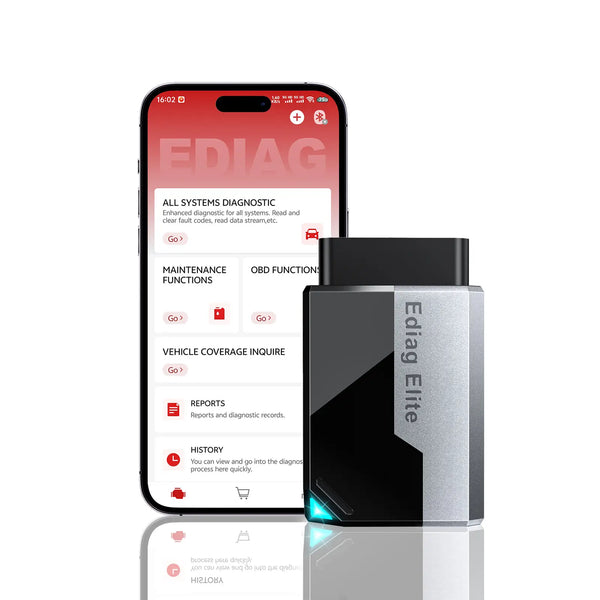
Best for Most DIY Owners: EDIAG Elite
A compact choice for code reading, full-system checks and supported active tests from your phone.
EDIAG Elite is the sensible starting point when you maintain one or several family vehicles and want more than a basic Mercedes code reader. It lists full-system diagnostics, 15+ service functions, bidirectional control, CAN FD, four-stream live-data graphing and lifetime online updates.
- Phone-based
- Full-system
- Active tests
- Lifetime updates
See the detailed buying considerations
- Requires a compatible iOS or Android phone or tablet.
- Mercedes module access, resets, active tests, adaptations and IMMO functions vary by chassis, year and system.
- It is not presented as a replacement for every factory XENTRY workflow.
- Confirm the exact function with your VIN when the job goes beyond generic OBD-II.
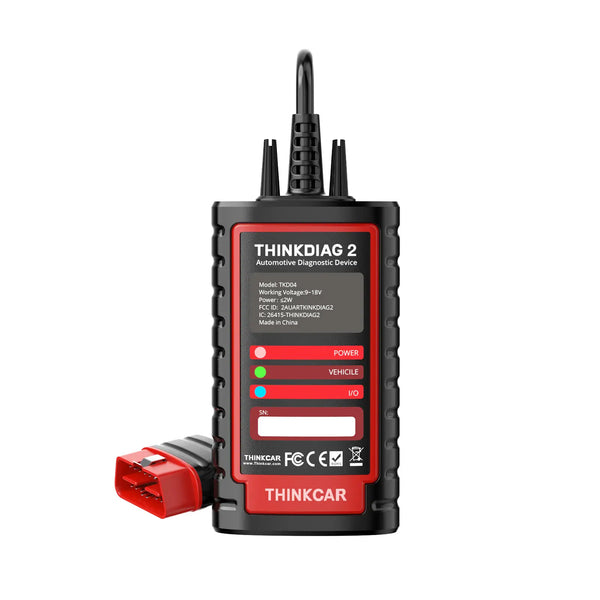
Best Advanced Phone-Based Option: ThinkDiag 2
For users who want supported coding and adaptation without moving to a dedicated tablet.
ThinkDiag 2 adds CAN FD, full-system diagnostics, bidirectional control, selected ECU coding and adaptation, IMMO-related functions and 15+ maintenance services in an app-based format. It is a better fit when a confirmed advanced function justifies the higher tier.
- CAN FD
- Selected coding
- Active tests
- 1-year updates
See the detailed buying considerations
- Uses a compatible phone and the ThinkDiag app.
- ECU coding, adaptation and IMMO coverage are selected functions, not universal programming.
- One year of free software updates is currently listed; check renewal terms before buying.
- Verify the required Mercedes module and function rather than relying on brand-level coverage.
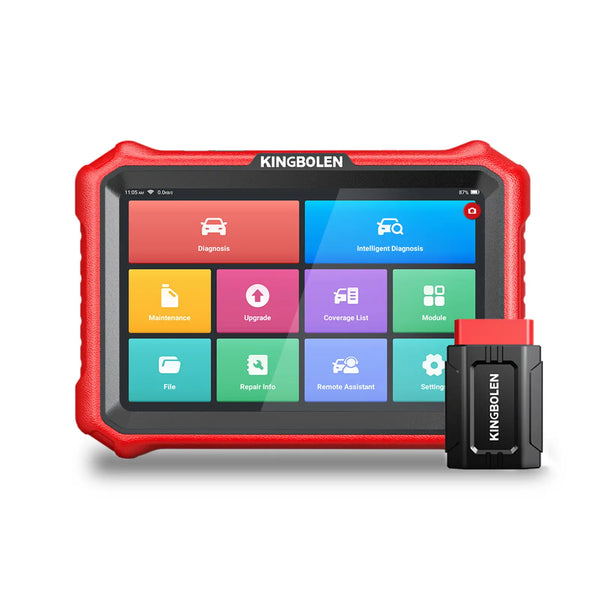
Best for Frequent Mercedes Work: K8 Pro
A dedicated wireless tablet for technicians, advanced users and repeat diagnostic work.
K8 Pro makes sense when the faster tablet workflow, 34+ listed service functions, CAN FD and DoIP support, advanced coding and lifetime updates will be used regularly. Its current specifications list offline coding for supported Mercedes-Benz applications.
- 8-inch tablet
- CAN FD + DoIP
- Advanced coding
- Lifetime updates
See the detailed buying considerations
- The dedicated tablet is easier to keep ready for regular shop-style work.
- Offline Mercedes coding is limited to supported vehicles, modules and procedures.
- DoIP and CAN FD are useful only where the vehicle and diagnostic function require them.
- Confirm security access, subscriptions or external authorization needed for protected operations.
Do not buy by feature count alone. Send the VIN, model year and exact task—for example, “read W205 SRS codes,” “register a replacement battery,” or “perform offline coding on this module”—to EDIAGTOOL support before ordering. A brand logo on a coverage list is not a function guarantee.
Mercedes Scanner Compatibility Checklist
- Record the full vehicle information: year, model, chassis code, engine and VIN.
- Name the warning or module: check engine, ABS, SRS, transmission, AIRMATIC, EPB, battery or another system.
- Name the action: read codes, graph data, reset, relearn, calibrate, run an active test or code a module.
- Check the connector: confirm whether the vehicle uses a standard 16-pin port or an older connector that needs the correct adapter and legacy software.
- Confirm advanced access: coding, IMMO and security-related jobs may need additional authorization or may not be available.
- Review ongoing cost: compare update terms and optional paid software before deciding on purchase price alone.
If you are still deciding between an app-based tool and a dedicated tablet, read our Bluetooth OBD2 scanner vs. diagnostic tablet guide. You can also compare the wider EDIAGTOOL OBD2 scanner range.
Frequently Asked Questions
What is the best OBD2 scanner for Mercedes-Benz?
Will any OBD2 scanner work on a Mercedes?
Can a Mercedes scanner reset ABS or airbag lights?
Can these scanners code a Mercedes?
Do older Mercedes cars need a 38-pin adapter?
Is XENTRY the same as an aftermarket Mercedes scan tool?
Bottom line: Choose by job, not by the longest feature list. EDIAG Elite is the practical choice for most Mercedes owners who want full-system diagnosis from a phone. ThinkDiag 2 is the next step when a supported coding or adaptation task is confirmed. K8 Pro is built for regular advanced work where a dedicated tablet, DoIP and deeper workflow justify the investment.
- Mercedes-Benz XENTRY Diagnosis Lite and adapter information
- EDIAGTOOL vehicle coverage check
- Current EDIAGTOOL product pages for EDIAG Elite, ThinkDiag 2 and K8 Pro.
Product details checked September 2, 2026. Prices, software policies and vehicle-specific functions may change. Confirm coverage for the exact VIN and required task before ordering.

