

Shopping for an OBD2 scanner under $100? Start with the job you need to do, then compare EDIAG C1, EDIAG Elite and ThinkDiag. C1 is currently listed at $49.90, Elite at $74.99 and ThinkDiag at $89.00. The comparison below separates diagnostic functions, connection methods and software terms so you can choose a tool for your vehicle and budget.
Best OBD2 Scanners Under $100: Quick Comparison
These three options use a compatible phone for diagnostics. Compare the supported functions and software terms as well as the purchase price. Advanced coverage varies by vehicle and system.
| Feature | EDIAG C1 | EDIAG Elite | ThinkDiag |
|---|---|---|---|
| Price at time of update | $49.90 | $74.99 | $89.00 |
| Best for | DIY users seeking a lower upfront price | DIY users prioritizing lifetime online updates | Users who need selected ECU coding |
| Connection | Bluetooth 5.3; EliteDiag app | Bluetooth 5.2; compatible iOS and Android device required | Bluetooth; compatible iOS or Android device required |
| Standard OBD-II | OBD-II diagnostics; confirm the specific modes needed | Codes, clear codes, live data, freeze frame, I/M readiness and other supported OBD-II modes | Codes, clear codes, live data and supported OBD-II functions |
| Full-system diagnostics | Supported vehicles and modules | Supported vehicles and modules | Supported vehicles and modules |
| Bidirectional tests | Supported vehicles and components | Supported vehicles and components | Supported vehicles and components |
| Service functions | 8 listed; availability varies by vehicle | 15+ listed; coverage varies by vehicle | 15+ listed; coverage varies by vehicle |
| Vehicle communication | CAN / CAN FD | Standard CAN, CAN FD and FCA AutoAuth | Confirm the required vehicle protocol with support |
| ECU coding | Check the exact requested function with support | Check the exact requested function with support | Selected ECU coding is listed; coverage varies |
| Update policy | First year included; paid subscription options after year one | Lifetime online updates listed | One year of free software updates listed |
Prices and vehicle coverage may change. Check your year, make, model and required function before ordering.
What Should You Expect From an OBD2 Scanner Under $100?
“OBD2 scanner” covers several different tool levels. A $25 wired code reader and a $75 app-based full-system scanner may both plug into the same diagnostic port, but they do not necessarily access the same modules or perform the same tests.
| Budget type | What it usually includes | Best for |
|---|---|---|
| Basic wired code reader | Generic engine codes, erase function, freeze frame and emissions readiness; some add basic live data | Occasional check-engine lights without using a phone |
| Basic Bluetooth adapter | Generic OBD-II data through an app; app cost, stability and features vary | Owners who already have a trusted diagnostic app |
| Advanced app-based scanner | Standard OBD-II plus supported full-system scanning, service functions and active tests | DIY maintenance and deeper troubleshooting across compatible modules |
Generic OBD-II coverage is broader than advanced coverage. Reading an emissions-related engine code on a 1996-or-newer U.S.-market vehicle does not guarantee that the same tool can access ABS, SRS, transmission, service resets, coding or active tests on that vehicle.
The Five Features Worth Paying For
- Freeze frame: preserves operating conditions from when an emissions-related fault was stored.
- Live-data graphing: helps reveal how supported sensor values change instead of showing only a static code.
- Full-system access: reads supported modules beyond the engine, such as ABS, SRS and transmission.
- Bidirectional control: commands supported components for active testing; available tests vary by vehicle.
- A clear update policy: shows whether continued software coverage will require future payments.
The Best OBD2 Scanners Under $100
This comparison uses the specifications, prices and software terms listed on our current product pages. It is not a hands-on test report. Vehicle-specific functions must be confirmed separately.

Lower Upfront Price: EDIAG C1
A $49.90 option for supported full-system diagnostics and active tests.
C1 connects through Bluetooth 5.3 and uses the EliteDiag app, with CAN / CAN FD support and eight listed service functions. The first year of software is included; paid subscription options are available after year one.
- Bluetooth 5.3
- Active tests
- 8 service functions
- CAN / CAN FD
See C1 software and coverage details
- Confirm your vehicle, system and exact function before ordering.
- Eight listed service functions: ABS bleeding, battery matching, brake reset, DPF regeneration, throttle relearn, injector coding, oil maintenance reset and steering angle reset. Availability varies by vehicle.
- Injector coding does not establish support for general ECU coding or programming.
- Review the current C1 software terms; FCA gateway access is a separate purchase where required.
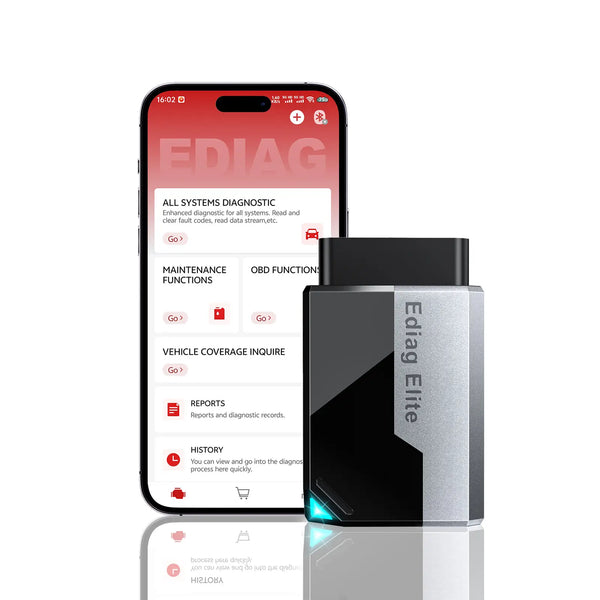
EDIAG Elite: Another Under-$100 Option
A $74.99 option with lifetime online updates listed.
Choose EDIAG Elite for supported full-system scans, active tests and four-stream live-data graphing without a listed annual update fee. Its listed communication features include CAN FD and FCA AutoAuth; confirm the exact vehicle and function you need.
- Bluetooth 5.2
- 4-in-1 live data
- Lifetime updates
- CAN FD
See the detailed buying considerations
- Requires a compatible iOS or Android phone or tablet.
- Standard OBD-II functions are broader than manufacturer-specific full-system functions.
- Active tests, resets, AutoVIN and module access vary by year, make, model and system.
- Confirm the exact function you need before purchase rather than relying only on the “120+ brands” figure.
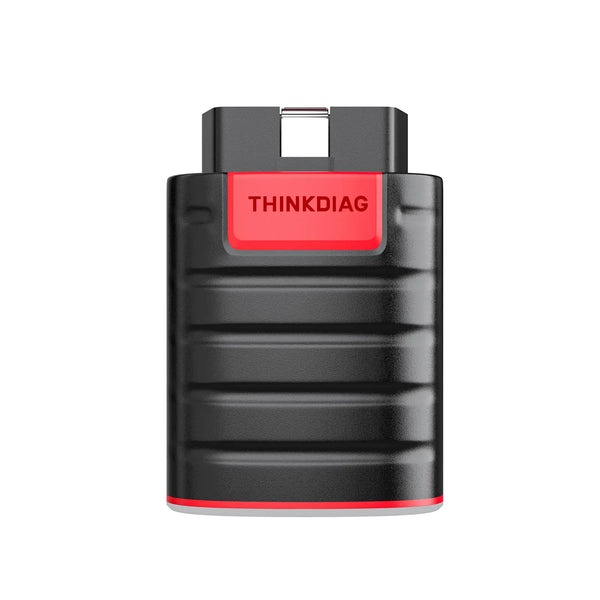
ThinkDiag: Check Its Supported Functions
An $89.00 option for confirmed, vehicle-specific coding needs.
Choose ThinkDiag when selected ECU coding is the priority. It combines supported full-system diagnostics, active tests and four-stream live data with one year of included software updates.
- Selected ECU coding
- 4-in-1 live data
- Full-system scan
- 1-year free updates
See the detailed buying considerations
- Selected coding functions are not universal ECU programming.
- Available modules, active tests, resets and coding depend on the exact vehicle.
- Check the cost and coverage implications after the included update period.
- Choose it for a confirmed supported coding need—not simply because “ECU coding” appears in the feature list.
How to Choose Before You Buy
A check-engine light needs engine OBD-II coverage. ABS, airbag, TPMS and transmission warnings require access to their respective modules.
Write down “read ABS code,” “register a battery” or “command the radiator fan.” Feature names are more useful than a long brand list.
Use the year, make, model, engine and requested function. Contact support with the VIN when coverage is uncertain.
Separate free app access, included updates and optional paid coverage. A lower purchase price can cost more later.
Phone-based tools are compact and good for graphs. A wired handheld avoids pairing and keeps a dedicated screen in the toolbox.
A scanner supplies evidence. It does not directly measure compression, fuel pressure, spark quality or every mechanical condition.
Coverage check: The safest buying decision is based on the exact function and vehicle—not statements such as “works on most cars.” Use the EDIAGTOOL vehicle coverage page or contact support with the VIN before ordering.
When Is a Cheap OBD2 Scanner Enough?
A basic wired reader may be the better purchase when all of the following are true:
- You only want to read generic check-engine codes.
- You need emissions readiness and basic freeze-frame information.
- You do not need ABS, SRS, transmission or body-module diagnostics.
- You do not need service resets or bidirectional tests.
- You prefer a dedicated screen and no phone app.
Compare supported functions rather than using price alone as a shortcut. C1 brings a lower upfront price to this comparison, while the software terms differ between models. If the work you need falls outside these tools’ confirmed coverage, browse the broader OBD2 scanner range and check the exact vehicle and function before buying.
Frequently Asked Questions
What is the best OBD2 scanner under $100?
Can a scanner under $100 read ABS and airbag codes?
Do budget scanners have bidirectional control?
Will an OBD2 scanner tell me exactly which part to replace?
Is a Bluetooth scanner better than a handheld scanner?
Can I leave a Bluetooth OBD2 scanner plugged in?
Choose for your next job: Confirm the system and function first, compare the software terms, then pick the device that fits your budget. Use the comparison above to shortlist C1, Elite or ThinkDiag, and check vehicle coverage before ordering.
Product details checked September 18, 2026. Prices, software policies and vehicle-specific functions may change. Check compatibility for your exact vehicle before ordering.

